Typography
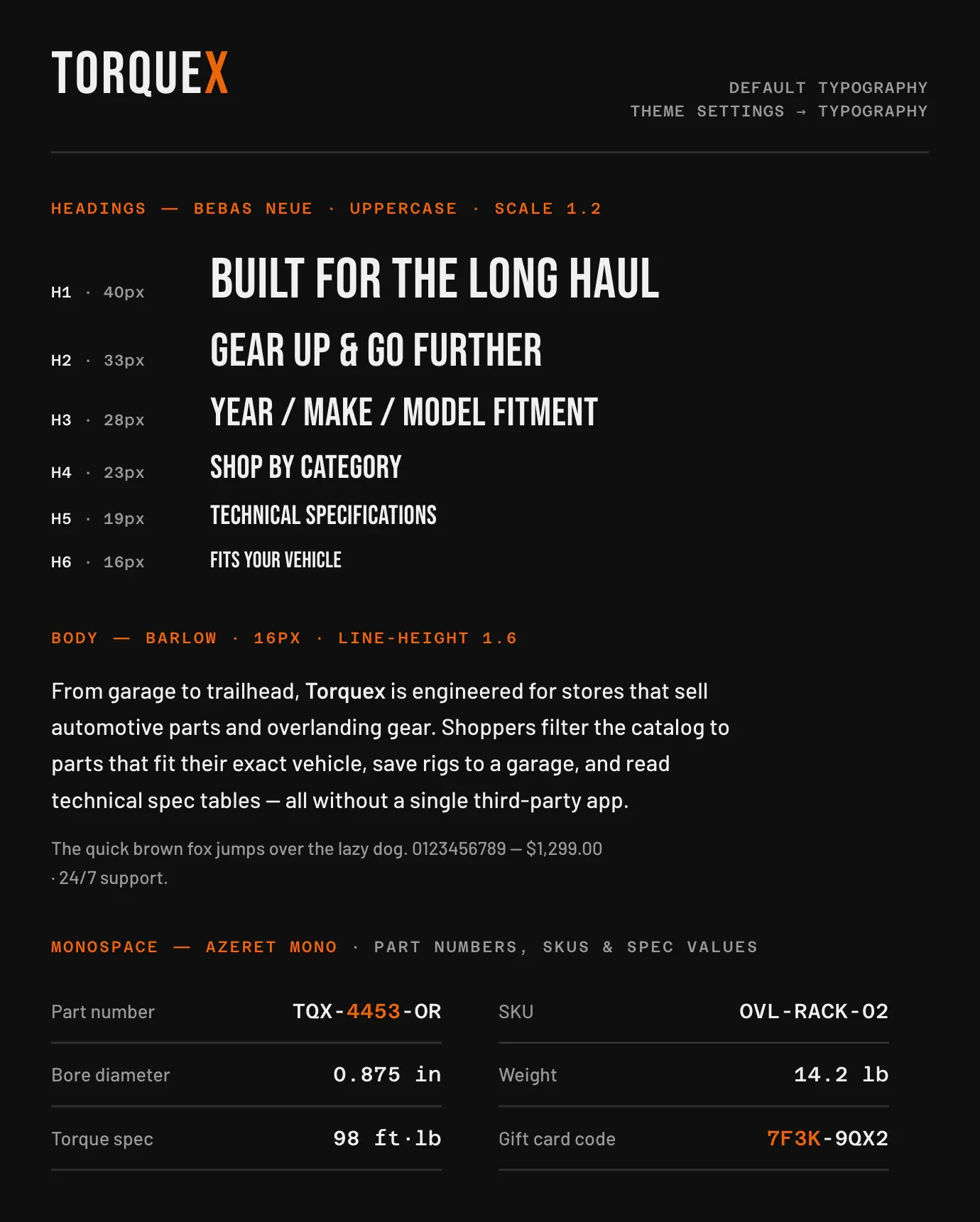
Found under Theme settings → Typography, organized into Fonts, Sizing, Heading style, and Monospace. Fonts come from the Shopify font library; non-system fonts are loaded over Shopify’s font CDN.
| Setting | What it does | Default |
|---|---|---|
| Heading font | Font used for all headings. | Bebas Neue |
| Body font | Font used for body and prose text. | Barlow |
| Base font size | Root font size in pixels; everything scales from it (range 14–20px). | 16px |
| Heading scale factor | How much each heading level grows relative to the body — larger values make headings more dramatic (range 1.1–1.5). | 1.2 |
| Body line height | Line height for body and prose text (range 1.3–2). Headings keep their own line height. | 1.6 |
| Heading transformation | Casing applied to all headings: Capitalize, Uppercase, or Lowercase. | Uppercase |
| Heading letter spacing | Adjusts tracking on all headings relative to the default (range −2 to 5px). 0 keeps the default; negative tightens, positive widens. | 0px |
| Use monospace font for technical text | When on, a monospace font is used for gift card codes, compare-table values, and code/tables in rich-text content. | On |
| Monospace font | The monospace font to use. Appears only when monospace is enabled. | Azeret Mono |
Related: Colors · Layout · Torquex support replies within 12 hours.