Age verification
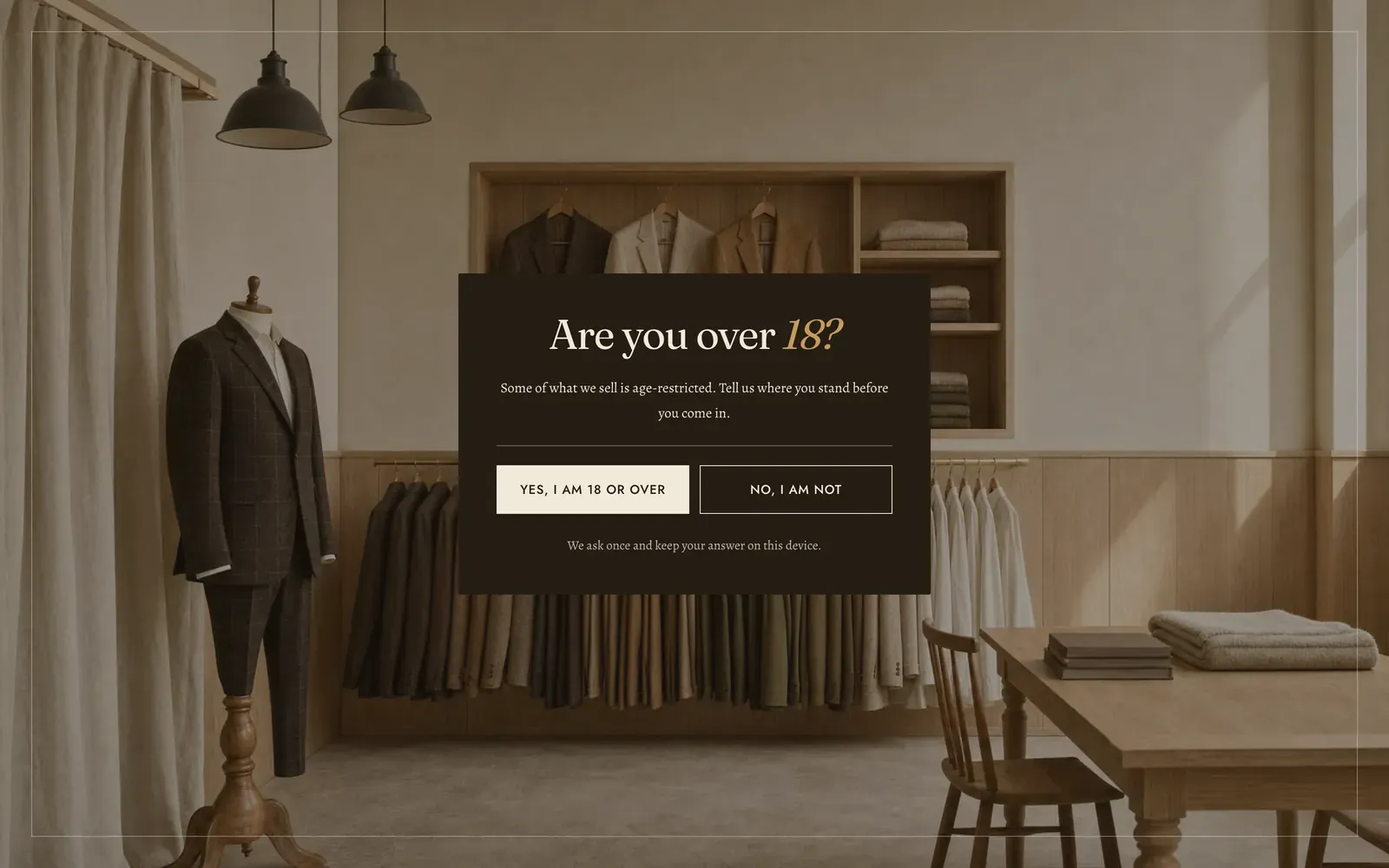
Age verification is a full-screen gate in front of the whole store. It is not a drawer: there is no close control, Esc does nothing, and a click on the background does nothing. The only way past it is an answer. It ships switched off.
It is a section you add. Open Online Store → Themes → Customize, open the Overlay group at the foot of the section list, choose Add section, and pick Age verification. You can have one, and you can remove it again.
What it does: asks every visitor whether they meet a minimum age before they see any page of your store, and keeps their answer so it does not have to ask again on the next page.
Turning it on
Section titled “Turning it on”| Setting | What it does | Default |
|---|---|---|
| Enable age verification | Off, the gate is not built at all and costs your store nothing. On, it asks every visitor before they see any page of the store. | Off |
The gate is a visitor’s first sight of your store, before a single page. Its colors and its backdrop are set under Background, below.
Behavior
Section titled “Behavior”| Setting | What it does | Default |
|---|---|---|
| How to ask | Confirm is the usual two-button question. Date of birth asks for a real date and works the age out, which is what a regulated line normally needs. | Confirm |
| Minimum age | The age you require, 13–25. Raising it asks everybody again, including shoppers who already answered. | 18 |
| Remember the answer for | How long a yes stands on that shopper’s device before the gate asks again, 0–90 days. Set 0 to ask once per visit. | 30 days |
In Date of birth mode the visitor fills a day, a month and a year in three separate fields, then presses the Enter button under them. Three fields rather than a native date picker, because a picker would open on this month and ask somebody to page back two hundred and forty times.
A date that does not exist, such as the 31st of February, is refused with a sentence saying so. A date that does exist is turned into an age and compared against Minimum age.
Remember the answer for decides where the yes is kept. Above zero it is kept with an expiry. At zero it lasts for the visit and goes with the tab.
Either way it is kept on that one device, in that one browser, and it is stored against the minimum age you set. That is why raising the bar from 18 to 21 re-asks everyone, rather than quietly letting the old answers stand.
A no is never remembered. The two controls are a tap apart on a phone, and a slip must not lock somebody out of your shop for a month.
Content
Section titled “Content”Write [age] anywhere in this copy and the gate puts in the number you set for Minimum age, so moving the bar does not mean remembering which six fields said 18.
| Setting | What it does | Default |
|---|---|---|
| Logo | An optional image above the question. For many visitors this is the first thing of yours they see. | None |
| Width | The logo’s width, 40–220 px. Shown only when a logo is set. | 96 px |
| Heading | The question itself. | Are you over [age]? |
| Text | Supporting copy under the heading. | Some of what we sell is age-restricted. Tell us where you stand before you come in. |
| Small print | A line under the buttons: where a link to your terms or privacy policy belongs. | We ask once and keep your answer on this device. |
| Yes button | The confirm label. Shown only when How to ask is Confirm. | Yes, I am [age] or over |
| No button | The decline label. Shown only when How to ask is Confirm. | No, I am not |
If they say no
Section titled “If they say no”| Setting | What it does | Default |
|---|---|---|
| When a shopper says no | Show a message turns the panel over and says so, keeping them on the page. Send them elsewhere takes them to an address you name. | Show a message |
| Send them to | Where a declining visitor goes. Shown only when the action is Send them elsewhere. | None |
| Heading | The headline of the refusal panel. | Come back another time. |
| Text | The copy of the refusal panel. | We can only sell to visitors aged [age] and over. Thank you for being straight with us. |
The refusal panel is written and rendered whichever action you choose, and that is deliberate. A redirect can stop being a redirect if the address is taken down. The gate then falls back to the message, rather than appearing to accept the answer. Leaving Send them to empty does the same thing.
The refusal panel carries a Take me back button to the question. There is always a way back from a mis-tap.
Background
Section titled “Background”| Setting | What it does | Default |
|---|---|---|
| Style | Solid stands the gate on a flat color from the scheme below. Image fills the screen with a photograph instead. | Solid |
| Color scheme | The gate’s own colors, covering the panel, the type, the buttons, and the flat ground under Solid. | scheme-night |
| Image | The photograph behind the panel. Shown only when Style is Image. | None |
| Overlay strength | How far the picture moves toward the color scheme’s background, so the panel over it stays legible, 0–90%. Shown only when Style is Image. | 45% |
Blocks: none. The gate is a fixed composition.
Keyboard and screen readers
Section titled “Keyboard and screen readers”The gate is a real dialog and it is modal, so the page behind it cannot be scrolled, tabbed into or read while it is up. Focus lands inside the panel on open and Tab cycles within it. When the panel turns over to the refusal and back, focus moves to whichever heading is now showing, so the change of state is read out rather than happening silently. Answering yes hands focus to the skip link at the top of the page the visitor has just been let into.
The gate checks for an earlier answer as the page opens, so a visitor who answered last week never sees it flash over a store they had already been let into.
In the theme editor
Section titled “In the theme editor”The gate is rendered in the editor whatever Enable the gate says, so you can write and judge it before you switch it on. Nothing opens itself there. Select Age verification in the sidebar and it opens. Deselect it and it closes.
Answering the gate stores that answer in the browser you answered it in, editor or storefront alike. When you want to check the gate as a first-time visitor sees it, open your store in a private window.
Related: Newsletter popup · Colors · Modals · Lapels support replies within 12 hours.