Slideshow
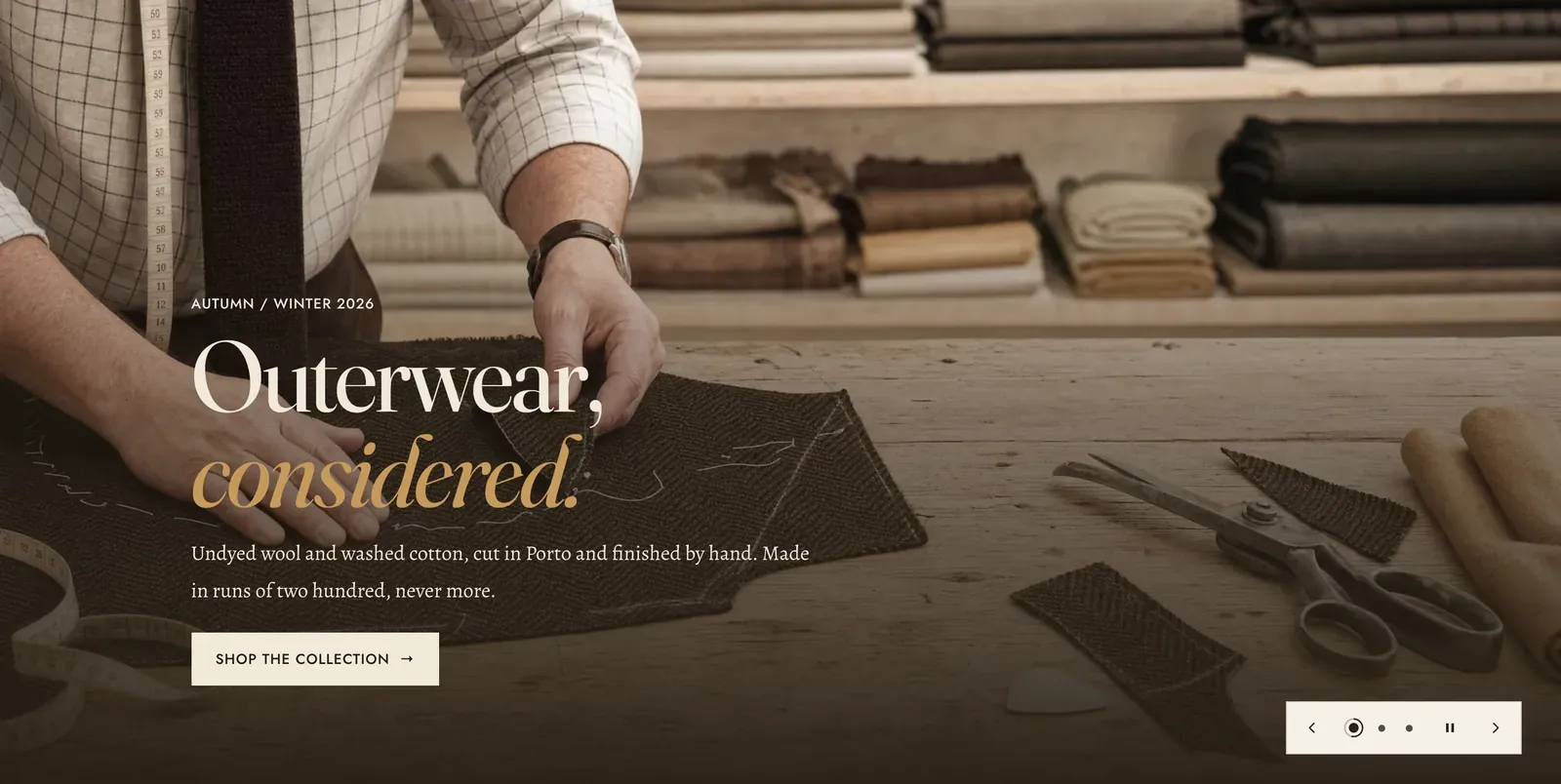
Full-bleed slides that advance on their own. Each block is one slide, and slides come in four shapes that can be mixed in the same section: a photograph, a film, a photograph with a copy panel beside it, or a film with a copy panel beside it.
What it does: Carries several statements in the space of one. It suits a store with more than one thing to say at the top of the page, such as a season, an edit and a house line, without giving each one its own screen of scrolling.
Key settings (in the section’s settings):
| Setting | What it does | Default |
|---|---|---|
| Color scheme | Section colors. Each slide sets its own overlay color separately, so this mostly governs the ground behind a split slide. | scheme-paper |
| Height | Small, Medium, Large, or Full screen. | Full screen |
| Maximum height | The ceiling on a large monitor. Choose 800px, 900px, 1,000px, 1,100px, or No maximum. | 900px |
| Use as the page heading | Makes the first slide’s heading the page’s main heading. Turn it on when the slideshow opens your home page, and off everywhere else. | Off |
| Autoplay | Advances on its own. | On |
| Duration | How long each slide holds, 4 to 12 seconds. | 6s |
| Show arrows | The previous and next controls. | On |
| Show position indicator | The marker showing which slide of how many. | On |
| Indicator | Dots or Bars. | Dots |
| Swipe mode | Off, Touch only, or Touch and mouse. The last one lets a visitor drag the slideshow with a mouse. | Touch and mouse |
| Control color scheme | The colors the arrows and indicator are drawn in, so they stay legible over any picture. | scheme-paper |
The section also carries a Section spacing group. Pick a Device of Desktop or Mobile, then set Top and Bottom.
Blocks: up to 8, of five kinds.
Image slide and Video slide
Section titled “Image slide and Video slide”Copy sits over the media.
| Setting | What it does | Default |
|---|---|---|
| Image / Video | The slide’s media. A video slide also takes a Poster image for the frame shown before play. | Empty |
| Mobile image | Image slides only. An optional second file cropped for narrow screens. | Empty |
| Alignment | Where the copy sits. Choose Left, Center, or Right. | Left |
| Heading width | Extra narrow, Narrow, Normal, Wide, or Full width. | Normal |
| Subheading | The small label above the heading. | ”Autumn / Winter 2026” |
| Heading | The headline. Italicize a word to set it in the emphasis font. | ”Outerwear, considered.” |
| Intro text | A sentence or two under it. | A line about undyed wool |
| Heading size | Small, Medium, or Large. | Large |
| Button label and Button link | Clear the label to leave the button off. | ”Shop the collection” |
| Overlay strength | Very strong, Strong, Medium, Soft, or None. | Strong |
| Direction | From the bottom, From the side, or From the corner. | From the bottom |
| Overlay color | Which scheme the wash and the copy are drawn from. | scheme-night |
The overlay settings sit under a Device switch. So a slide can be washed strongly on a phone, where the picture is cropped tight and the copy sits over the busiest part of it, and softly on a desktop.
Split image slide and Split video slide
Section titled “Split image slide and Split video slide”The media takes one half and a solid panel takes the other. The copy sits on the panel rather than on the picture, so contrast is never in question.
| Setting | What it does | Default |
|---|---|---|
| Image position / Video position | Left or Right. | Left |
| Action mode | Button ends the panel with an ordinary link. Product ends it with a real product, its price, and a buy control. | Button |
| Button label and Button link | Used in Button mode. | ”Shop new in” |
| Product | Used in Product mode. | Empty |
| Product button | Quick view opens the product in a panel without leaving the page. View full details goes to the product page. | Quick view |
| Panel color scheme | The panel’s own colors. | scheme-mat |
| Subheading, Heading, Intro text, Heading size | The copy on the panel. | ”A small system, strictly kept.” |
| Badge | A short word pinned onto the picture, such as “New in” or “Last of the run”. | Empty |
| Shoppable product | Pins a small product chip onto the picture itself, so the photograph is clickable. | Empty |
| Color scheme | The colors of that badge and chip. | scheme-mat |
Custom Liquid
Section titled “Custom Liquid”Fills a slide of its own with code. It takes Code, an Alignment, and a Content width of Narrow, Normal, or Wide.
When to use it: Use it when you genuinely have two to four things to say. One slide is a Media hero with extra machinery. Past five slides, most visitors never reach the last one. If the slides are chapters meant to be read in order, Hero scroll sequence advances on scroll instead, which no one can miss.
Related: Media hero · Hero scroll sequence · Slideshow tabs · Quick view · Lapels support replies within 12 hours.