Multi scrolling text
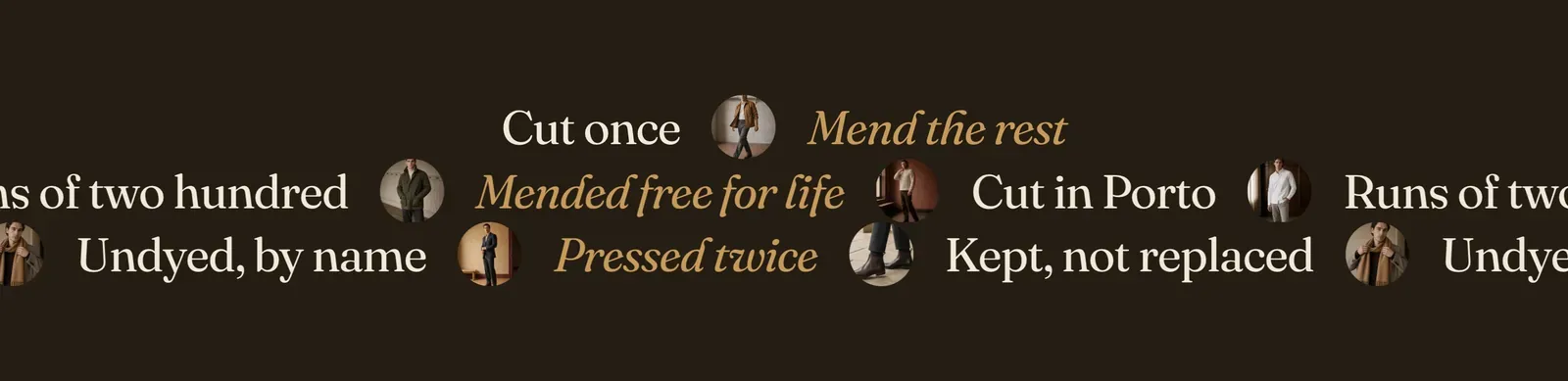
Several tickers stacked into one band. Each Row block is one line of phrases, and each row decides for itself whether it travels and which way. So rows can cross each other, or one can hold still while the others move around it.
What it does: Turns the ticker into a piece of typography. One row is a rule between sections. Three rows moving against each other is a section in its own right.
Key settings (in the section’s settings):
| Setting | What it does | Default |
|---|---|---|
| Color scheme | Section colors. | scheme-night |
| Speed | 1 to 10, shared by every row that travels. | 1 |
The section also carries a Section spacing group. Pick a Device of Desktop or Mobile, then set Top and Bottom padding from 0 to 200px. Desktop starts at 96px and mobile at 56px.
Blocks: Row, up to 5. Each row holds its own Phrase blocks.
| Row setting | What it does | Default |
|---|---|---|
| Motion | Scrolling or Fixed. A fixed row is set out and stays put, which is what gives the moving rows something to move against. | Scrolling |
| Scroll direction | To left or To right. Set adjacent rows opposite and they read as crossing. | To left |
| Separator | The mark between this row’s phrases. Choose Ring, Diamond, Dot, Dash, Slash, or None. | Ring |
| Phrase setting | What it does | Default |
|---|---|---|
| Text | The phrase. | ”Runs of two hundred” |
| Image | Optional. Takes the separator’s place after this phrase, as a small round thumbnail. | Empty |
As it arrives the section carries three rows: one fixed, one travelling left, one travelling right.
When to use it: Use it once, as a statement band. It usually sits between the top of the page and the first product section. When you want a single quiet rule instead, use Scrolling text.
Related: Scrolling text · Text banner · Scrolling promotion · Lapels support replies within 12 hours.