Product comparison
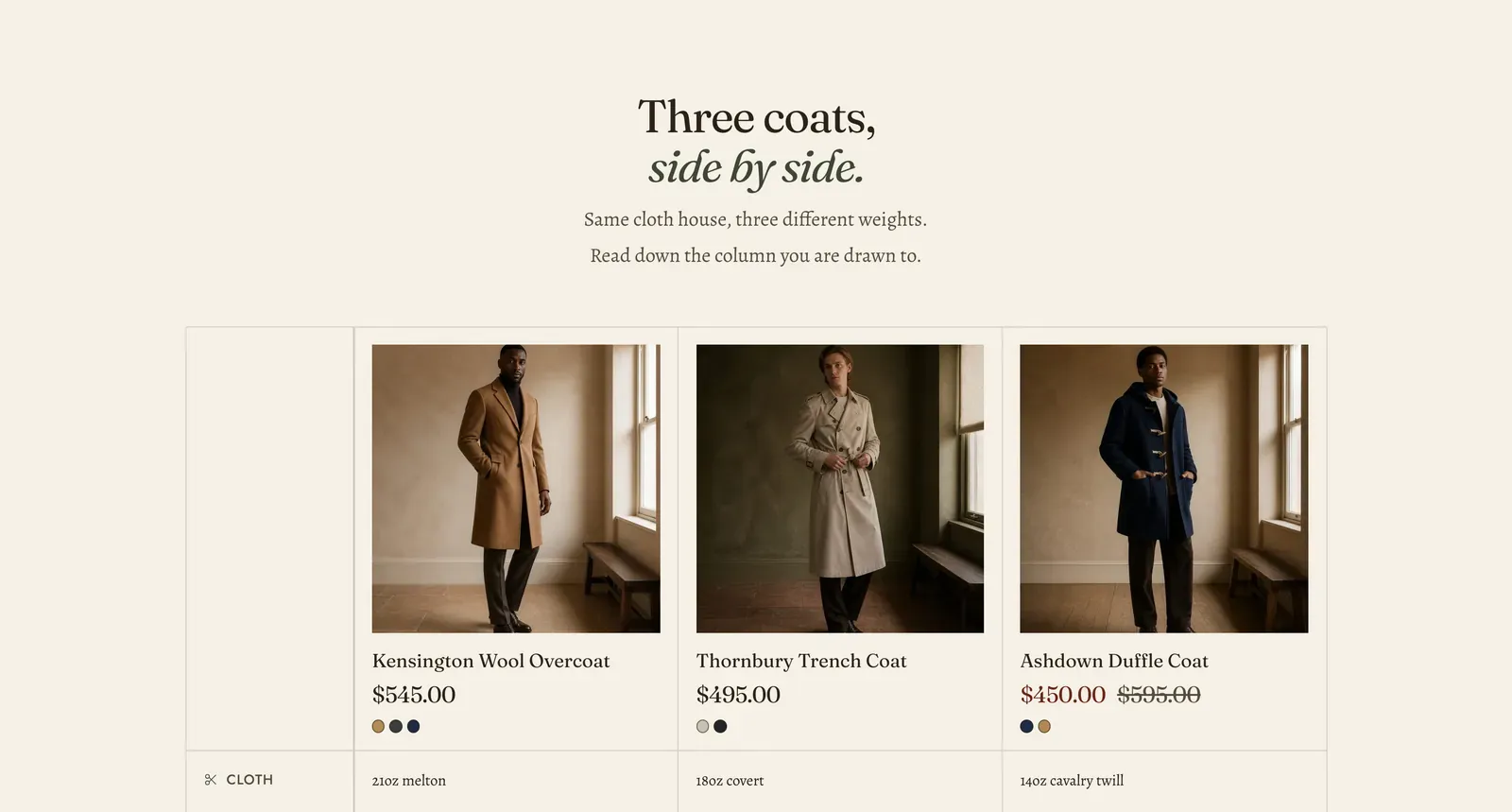
Products as columns, specifications as rows. Each Product block is a column with its own picture, price and colors. Each Spec row block is a line across all of them.
What it does: Answers “which one of these should I buy?” without making the customer open three tabs. It suits a family of pieces that differ in ways a photograph cannot show, such as weight, lining, or where it was made.
Key settings (in the section’s settings):
| Setting | What it does | Default |
|---|---|---|
| Color scheme | Section colors. | scheme-paper |
| Alignment | Left or Center, for the contents of the cells. | Center |
| Freeze row labels on mobile | Pins the row names to the left edge while the columns scroll sideways under them. | Off |
| Heading width | Narrow, Normal, Wide, or Full width. | Wide |
| Heading alignment | Left, center, or right. | Center |
| Subheading | An optional small label. | Empty |
| Heading | The headline. Italicize a word to set it in the emphasis font. | ”Three coats, side by side.” |
| Intro text | A line under it. | ”Same cloth house, three different weights…” |
| Image ratio | Tall (2 by 3), Portrait (3 by 4), Square (1 by 1), or Landscape (4 by 3). | Square |
| Show price | Prints each column’s price under its picture. | On |
| Show colors | Prints the color options as dots. | On |
| Button label | The button at the foot of every column. | ”View details” |
The section also carries a Section spacing group. Pick a Device of Desktop or Mobile, then set Top and Bottom.
Blocks: Product and Spec row, up to 20 between them.
| Product setting | What it does | Default |
|---|---|---|
| Product | The column’s product. Picture, price and colors are read from it. | Empty |
| Highlight this column | Draws one column out from the others. Use it for the one you recommend. | Off |
| Badge | A short word over the column, such as “Most bought” or “Warmest”. | Empty |
| Spec row setting | What it does | Default |
|---|---|---|
| Row label | The name of the line, such as “Cloth”, “Weight” or “Lining”. | ”Cloth” |
| Icon | A mark beside the label, or None. | None |
| Values | One value per column, separated by the | (pipe) character, in the same order as the Product blocks above. | ”21oz melton|18oz covert|14oz cavalry twill” |
When to use it: Use it for two to four products a customer is genuinely choosing between. For a comparison that is not about specific products, such as your brand against the alternatives or what each service tier includes, use Spec table. It has no products in it at all.
Related: Spec table · Pricing table · Product bundle · Lapels support replies within 12 hours.