Text tabs
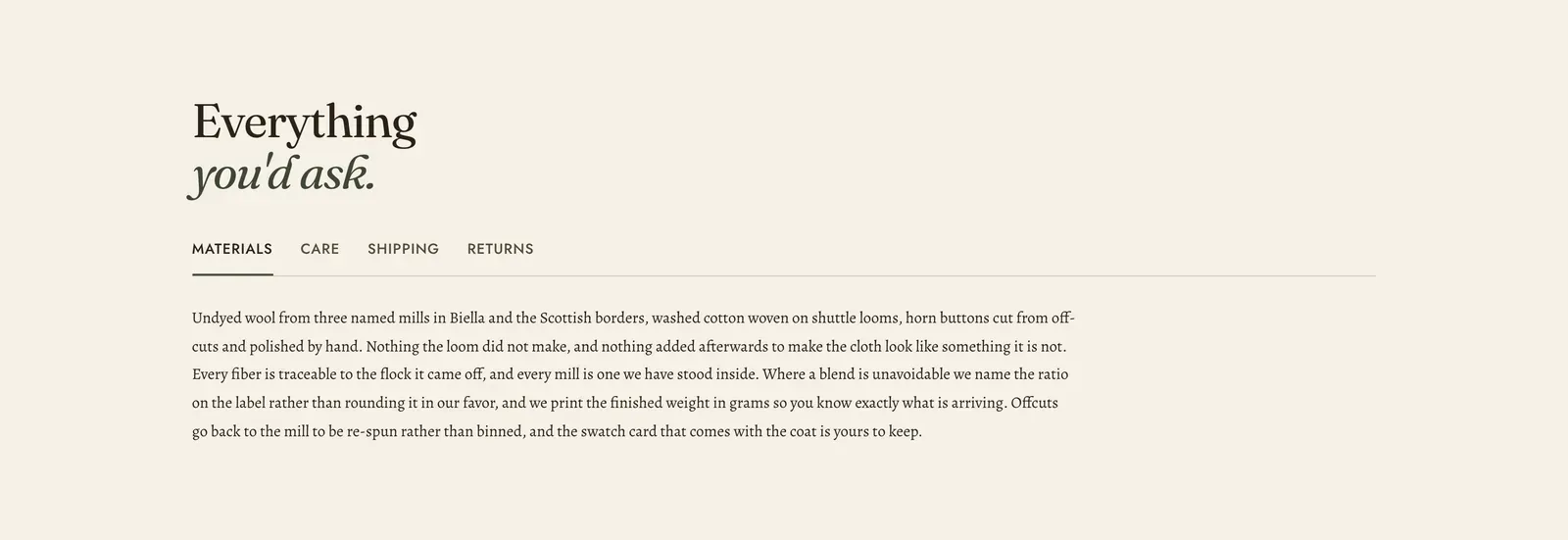
Several long passages stacked behind one row of tabs. Each Tab block is one panel of rich text.
What it does: Holds the reference copy every clothing store needs, without giving each piece a screen of its own. What it is made of, how to look after it, when it arrives, how to send it back. The customer reads the one they came for.
Key settings (in the section’s settings):
| Setting | What it does | Default |
|---|---|---|
| Color scheme | Section colors. | scheme-paper |
| Heading width | Narrow, Normal, Wide, or Full width. | Wide |
| Heading alignment | Left, center, or right. | Left |
| Subheading | An optional small label above the heading. | Empty |
| Heading | The headline. Italicize a word to set it in the emphasis font. | ”Everything you’d ask.” |
| Intro text | An optional line under it. | Empty |
The section also carries a Section spacing group. Pick a Device of Desktop or Mobile, then set Top and Bottom.
Blocks: Tab, up to 6.
| Setting | What it does | Default |
|---|---|---|
| Tab label | The word on the tab. One word is better than three, because the row has to fit on a phone. | ”Materials” |
| Body | The panel’s copy. Rich text, so headings, bold, links and lists all work. | A passage about cloth and buttons |
When to use it: Use it on a product page for materials and care, or on a help page for the long-form policies. When the content is a list of short questions and answers, use FAQ, which opens several rows at once and is better for scanning. When the tabs should reveal products, use Product tabs.
Related: FAQ · Product tabs · Rich text · Spec table · Lapels support replies within 12 hours.